Hey there, fellow designer! Chances are good you’ve been linked to this after doing some annotation work on a design you've been creating.
First off, I want to thank you for taking the time to address accessibility considerations in your work. No, seriously. I mean it.

Accessibility-oriented annotations are still a relatively rare thing in our industry. I applaud your efforts to buck that trend, and hope that this post does not dissuade you from future attempts.
On focus order
There’s a subtle thing at play here, and it mostly revolves around the notion that adding something demonstrates effort and value. For focus order, you’ll actually want to suppress that urge and just let things be.
Yes, many accessibility annotation kits do come with the ability to specify focus order. And yes, being able to place focus on the interactive parts of your website or web app is an important thing.
However, interactive elements allow you to place focus on them without needing to do anything else. This includes buttons, links, form fields, checkboxes and radio buttons, expand/collapse toggles, tab panels, etc.

This is possible if the engineer—or LLM—who builds the user interface (UI) uses semantic elements. This means things like the button element for buttons, the anchor element for links, etc. Also know that it is a whole other set of problems if semantic elements aren’t used.
The order itself
When it comes to web accessibility, the order interactive elements receive should be a logical order. For the vast majority of situations, this means matching reading order.
For example, English means focus order is left-to-right, top-to-bottom. Arabic means right-to-left, top-to-bottom, etc.
The easiest way to guarantee focus order matches reading order is to ensure the underlying HTML that powers your web experience is written in top-to-bottom order, where the width of the viewport controls where content flows to the next line.
Fortunately, top-to-bottom HTML order is how the majority of the web is still built.
If you don’t believe me you can spend a little time poking around with browser developer tooling. I like using the inspect element feature for this because you can highlight UI in the browser tab and see its corresponding code in context of the rest of the page or view.
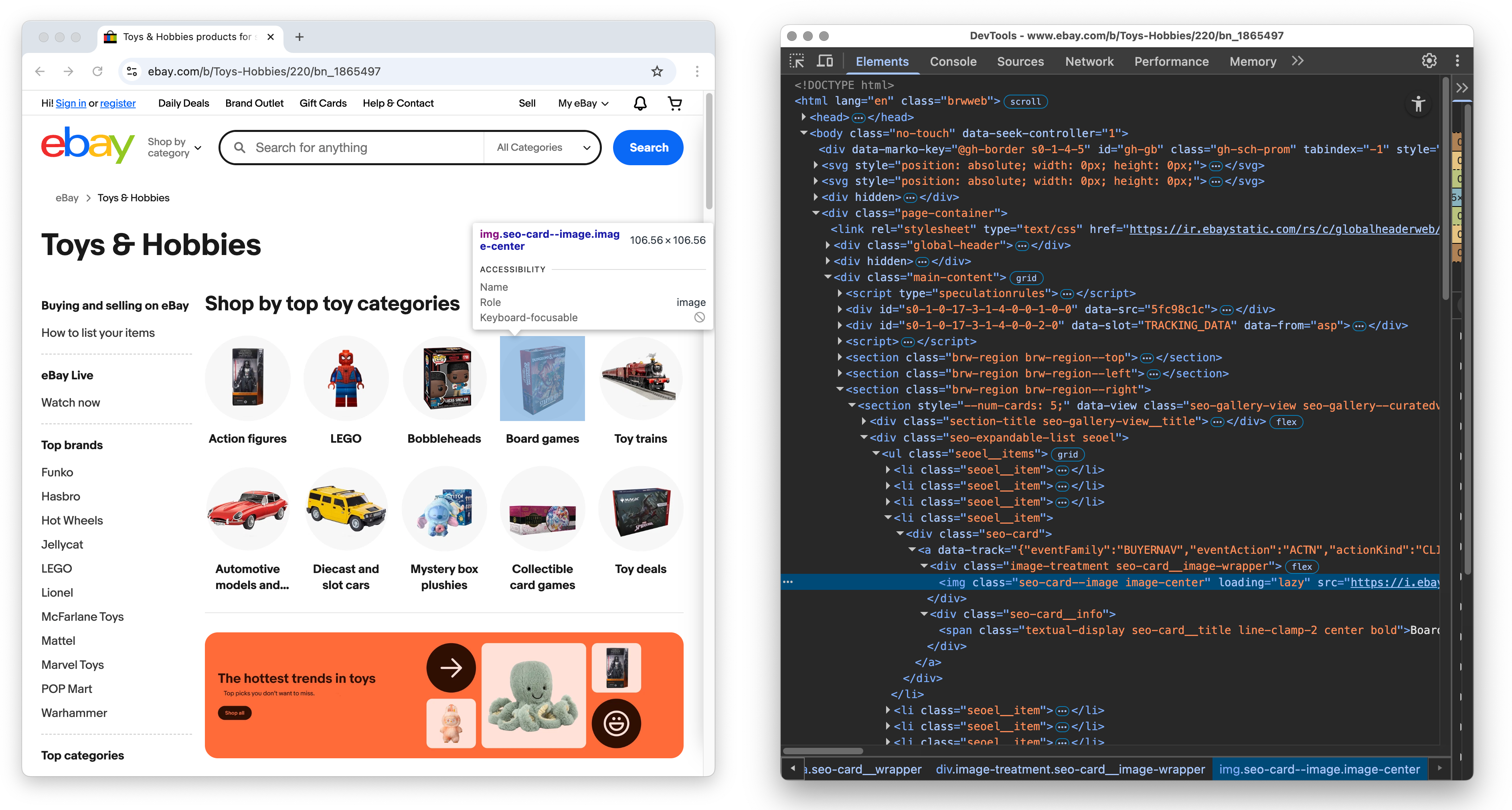
Why is focus important?
A consistent, predictable, and logical focus order helps a large number of people use your website or web app. This includes working with assistive technologies such as:
- Screen readers,
- Magnification,
- Voice control,
- Switches,
- Etc.
It’s also something I’m willing to bet you’ve benefitted from when filling out forms, using Tab to quickly jump from input to input.
So, why do annotation kits include focus order options?
Honestly, good question. Focus order annotations serve two general use cases:
- When the HTML order does not match reading order. This sometimes happens as a result of third party code, some relatively obscure CSS layout techniques, or other corner-case scenarios.
- When you need to do deep custom UI work. There are certain kinds of complicated components and flows that benefit from having the order of focus explicitly illustrated for development handoff. For example, I used them when helping to make GitHub’s interactive list component.

What should I do instead?
If you want to use your time efficiently: There is a tremendous amount of value in manually evaluating focus order on the developed UI.

And it’s easy to perform manual evaluation! All you have to do is press the Tab key and ensure each time you do that:
- There is a visible focus treatment applied to each interactive piece of UI, and
- Focus moves in the reading order of the language used for the design, and does not skip anything over.
You’ll want to do this on the live, public version of the website or webapp, since that is what the people who use your service will be using. Then file bug reports in the appropriate places if you run into things not working as expected.
As a pro-tip, you can also prime your focus so you don’t have to Tab over primary navigation and other templated interactive elements repeated across different pages or views.
Given that assumptions are just that, you could also look into explicitly documenting:
- HTML order should follow reading order, and also
- Semantic HTML should be used for interactive elements.
Be strategic in how you go about this. It might ruffle some feathers, especially in larger and more siloed organizations.
Other misconceptions
While I have you, here are a few other missteps related to focus order that I’ve encountered. These all break expectations and may confuse and disorient the people who use your service:
- Manually orchestrating a designed experience for where focus should go via use of
tabindex. - Making inert, static text focusable to make it more “important.” People already have ways to work with this kind of content.
- Removing the ability for interactive elements to receive focus in an attempt to direct someone to features the organization prioritizes.
- Assuming engineers know what component you’re using in your design, and where its documentation lives.
- Annotating the repeated, templated parts of a page or flow that have already been developed.
Again, thank you
Meryl K. Evans has a quote about accessibility that I try to live by, and that is “Progress over perfection.”
To that point, thank you for being open to reading this post—I hope you don’t feel anger, shame, frustration, or other negative emotions in response to trying to do the right thing. I also hope that you don’t drop your accessibility efforts all together.
Instead, know that making the web a little bit more accessible—and therefore a little bit better—adds up over time. This also includes how you learn about the details and nuance of designing for disability.
One of the web’s better capabilities is its ability to be revisited and updated. It means that past efforts can be improved on as easily as making something new. In a way, it can also be a form of kindness you can extend to your past self—it’s something I’m also trying to be better at.
In closing, I’ve included a list of more resources at the end of this post. I hope it can serve as a springboard to learn more about focus.
Further reading
- Glossary: Tab order explained The A11Y Collective
- Browsing with a keyboard TetraLogical
- Source Order Matters Adrian Roselli
- Technique G59: Placing the interactive elements in an order that follows sequences and relationships within the content W3C WAI
- How-to: Use the tabindex attribute The A11Y Project